
Getting API Credentials Just Got A Lot Simpler
If you've built an integration with Egnyte, you know the process: register at developers.egnyte.com, create an account, wait for approval, and get your credentials. It works, but for admins who simply want to start making API calls against their own domain, the process isn’t simple or fast enough. Starting today, that changes.
Egnyte admins can now generate Collaborate API credentials directly from the Egnyte App Store—no external registration, no approval wait, no context-switching. Click a tile, pick your application type, and start building.
What's New
A new Create API Key tile is now live in the Egnyte App Store. Click it, and the system handles everything automatically by checking for an existing developer account, creating one if needed, and provisioning an auto-approved API key with sensible defaults. If you already have a key for this domain, your existing credentials surface instantly.
How It Works
The entire flow takes only seconds:
- Click the Create API Key tile in the Egnyte App Store.
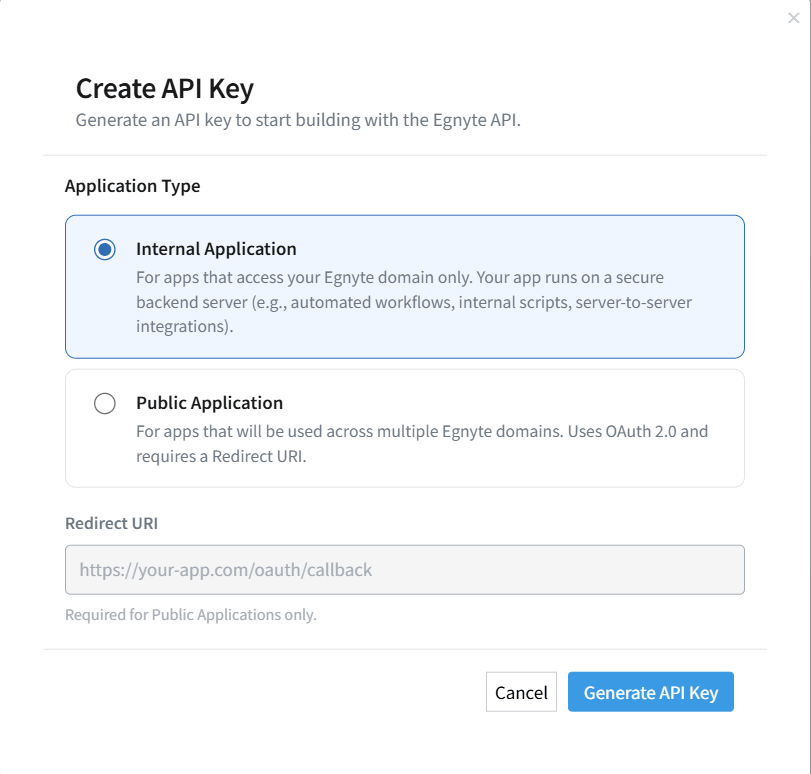
- Select your application type—Internal or Public.
- If Public, enter your Redirect URI.
- Your Client ID and Client Secret are generated instantly—no wait.
Already have a key for the domain? The tile opens directly to your existing credentials.
Two Application Types, Built for Different Needs
When you generate a key, you’ll select from two application types:
- Internal application: For apps that access only your Egnyte domain. Built for server-to-server integrations, automated workflows, and internal scripts running on a secure backend.
- Public application: For apps used across multiple Egnyte domains. Uses OAuth 2.0 and requires a redirect URI, matching the standard public app authentication flow documented at developers.egnyte.com.
You can update the application type and redirect URI later from the same tile—no need to regenerate.
What You Get
Every auto-generated key comes ready to use, with:
- Client ID and Client Secret, viewable and copyable directly from the tile
- Rate limits: 2 requests per second, 1,000 requests per day
- Status: Approved, immediate access, no queue
A Few Things to Know
Before using the new process to generate API credentials, note the following:
- One API key is allowed per admin, per domain. If you manage multiple Egnyte domains, generate a separate key for each.
- You’re allowed a maximum of 5 API keys per domain across all admins. Beyond that, admins are directed to developers.egnyte.com.
- The new process works with eligible Egnyte plans. Trial, Legacy Office, and Team plan domains can’t access this feature.
Start Building
If you're an Egnyte admin on an eligible plan, the Create API Key tile is now available in your App Store. Grab your Client ID, and start building against the Egnyte API.
For full API documentation, authentication guides, and endpoint references, visit developers.egnyte.com.